Expert Virus Removal Services and Technical advice.

We are Providing Computer users with Expert Virus Removal Services and Technical Advice.

Threats and their Removal.

Do you need a quick solution to a technical problem? With our live remote-assistance tool, a member of our support team can view your desktop and share control of your mouse and keyboard to get you on your way to a solution.

Spywares and their Removal.

Are you worried that your computer might be nfected with Spywares? Then this is were you can find Support.

Advices for Protecting the Computer.

Expert Advices for Protecting your computer from attacks from all threats

Different Anti Virus Software and Tools.

Familiarizing different Anti Virus Software and removal Tools.

Showing posts with label AntiVirus. Show all posts

February 16, 2011

Misleading Applications


Have you ever seen a strange security message pop up like an advertisement while you're surfing the web? Have you seen an unexpected balloon message appear from an unknown program on your system, telling you that you’re infected with a new threat? These are common tactics used by a type of program called "misleading applications" and other people refer to as “Rogue Software” or “Rogue Anti-Virus”. These programs typically sneak onto their victims’ systems while they surf the web, masquerade as a normal Microsoft Windows alert, or otherwise trick people into downloading them onto their computer. Once installed, misleading applications exaggerate or make false claims about the security status or performance of your system, then promise to solve these bogus problems if you pay them.

What are misleading applications?

Misleading applications intentionally misrepresent the security status of a computer. Misleading applications attempt to convince the user that he or she must remove potentially malware or security risks from the computer. The application will hold the user hostage by refusing to allow him or her to remove or fix the phantom problems until the “required” software is purchased and installed. Misleading applications often look convincing the programs may look like legitimate security programs and often have corresponding websites with user testimonials, lists of features, etc.

How they Attack?

Why are they dangerous?

The victims of misleading applications have paid for software that does not work, handed their personal information to scammers, and are left with a false sense of security that leads them to potentially greater risks from more aggressive threats. Even if a person catches on to the ruse and does not pay the misleading application vendor, the programs can be notoriously difficult to remove without the proper security software.
What To Do?
  1. Use a legitimate Antivirus to proactively protect from spyware and other security risks
  2. Configure the firewall in Antivirus software to block unsolicited requests for outbound communication
  3. Be especially cautious when clicking on pop-up advertisements especially ads promoting system security or performance tools that look like a standard Microsoft Windows alert
  4. Do not accept or open suspicious error dialogs from within the browser
  5. Purchase security and system performance software from reputable sources
  6. Keep software and security patches up to date

December 17, 2010

Things to look for in selecting an Anti-virus Program

Features of a Good Anti-Virus:

Things we need to look for,when we purchase an anti-virus are: 
  • Good scanning engine
  • Behavioral Scanning feature 
  • Resource friendly
  • Install and uninstall without any problems
  • No conflicts with other software
  • Boot level Scanning
  • Last but not least, User friendly and Operating system flexible
We need to look for its scanning engine; how deep it scans the computer, whether it scans the system files, compressed files etc.. Also different scanning options, like Quick scan, Full Scan, Custom scan.
Now a days we are getting scanning options like root-kit scanning malware scanning built in to the original scanning module. This avoids purchasing an additional protection software for that infections.

This is another point we need to look for. Internet security is one other thing that has led to the concept of Firewall. Firewall is a tool that monitors that network traffic. We can have some ports blocked or allowed using a firewall. It helps us protect our computer from hackers

Browser and Email protection:  Companies have doubled their ideas and came up with concept of Email Client and browser protection. Browser protection comes with different names like site advisor, safe search, Identity protection etc.. Email protection helps us in preventing unwanted junk files to be filtered and deleted including spam.
However, it is our duty not to open any mails that are from unknown senders and that has links that lead to infiltration of different infections. Spammers always try to send spam mails that will always attract our attention.

Internet Security comes with parental control as well. It is a good tool to monitor kids and help them use the Internet safely. 

End of the day, though we use any good anti virus it is our responsibility to be careful in opening sites that are risky and protecting our programs, network and files with a password. Last but not least look for compatibility with your operating system. For instance if we purchase a security program that is compatible with XP computer it is not compatible with vista. So please take some time in looking for these things in an anti-virus program and go for it.

November 23, 2010

CLOUD COMPUTING: AntiVirus in the CLOUD?

             Practically all of the major antivirus companies have started using in-the-cloud technologies or are planning to use them in the nearest future. Despite the undoubted advantage with regard to the struggle against attacks, in-the-cloud technologies are themselves sure to be a prime target for the cybercriminals.

The eternal conflict between virus and antivirus has, up to the present moment, been largely going on at the level of files and processes on the end users’ machines. Malware programs have been trying to destroy the antivirus system by different means or attempting to persuade the user to switch it off themselves.

With the beginning of cloud- technology detection and categorization, a new front has opened up in this war. Malware programs, or to be more precise – their authors, will have to solve the problem of attacking the cloud. Although technologically it is practically impossible to destroy the cloud, direct mass DDoS attacks aside, it is quite vulnerable in terms of its own functionality - receiving, processing and sending information to and from the end users.

Problems within the very architecture of the majority of antivirus clouds will be actively used by the cybercriminals, and the first examples of such actions can be seen already. The most widespread and simple method of disabling cloud technologies is to block computer access to the cloud. More complex methods include the substitution of data –with the aim of ‘trashing’ the cloud with false information, as well as modification of the data received from the cloud.

Such ‘trashing’ is probably the most dangerous threat. Blocking access to the cloud or the modification of responses from the cloud specifically affects only infected users, but inputting false data into the cloud
will influence every single user. This would bring with it not only an absence of detection, but also to a more serious problem – false positives, which would lead to a general decline in the level of trust in cloud-based technologies and to the necessity to revise or alter their performance algorithms.

With the increase in the number of antivirus technologies that operate using in-the-cloud technologies, there will be a constant quantified and qualified growth in the number of attacks upon them from malware programs on clients’ computers, and additionally with the help of special services, supported by the cybercriminals.

GLOOMY STATISTICS.

A fake scanner based on Javascript looks quite genuine to an inexperienced user
            There are many types of malicious programs designed to scare people into buying a licence for a worthless program usually for windows. Their names may differ depending on the functionality and the way of packing/compressing the binary files. Thus, rogue antivirus programs may be contained in, among other examples, the following signatures: not-a-virus:FraudTool (this program is ascribed to the ‘not a virus’ category due to the lack of a malicious payload, apart from its attempts to persuade users to pay money for a nonfunctioning application), Trojan.Win32.RogueAV, Trojan.Win32.FraudPack or Trojan-Downloader. Win32.Agent.

The diagram refers to FraudTool signatures and shows the Top10 rogue antivirus programs. Due to the huge number of signatures it is difficult to tell for sure just by the name whether a particular malicious program represents a group of rogue antivirus solutions or not.

A bogus YouTube website. A false message informs the user that it
is necessary to update their copy of Flash Player. Cybercriminals
often covertly insert malicious programs into a user’s system by
this method, any one of which may be a rogue antivirus solution
In total, there were 266,090 victims of FraudTool.Win32 in all of the countries. First place goes to Vietnam with over 120,000 cases of FraudTool.Win32 infection.

A study shows the number of malicious programs detected on particular days for the period from March to June. From mid-March, the number of infections has systematically decreased. In March, there were 192,000 infections in total, in April 150,000, in May 135,000 and between 01 and 17 June 58,000 infections, which indicates that the number of infections in June will probably be even smaller than in May. However this fact only proves that like everyone everywhere, cybercriminals also like to take their vacations in summer. As with other malware distribution, scareware peaks in spring, autumn and before New Year.

Microsoft as the biggest software vendor is engaged in a campaign against this type of fraud also. Its website informs visitors how to remove an unwanted program and how to tell the difference between a false version of Windows Defender and the real one,which is built into the Windows system.

Summary:

Rogue antivirus programs are quite successful, which seems to be confirmed by the fact that cybercriminals look for new methods to entrap unwary users. Cybercriminals are getting better and better at making their products similar to known security applications. As a result, companies lose the trust of their customers, whilst the customers themselves, quite apart from money, can lose passwords and logins to bank and email accounts, social networks, etc. This means that the identity of the victim is under threat. We can easily predict what will happen next. With a new ID, a cybercriminal can open a bank account in somebody else’s name and use it with impunity, as it is the victim that will be responsible for the cybercriminal’s actions.

November 19, 2010

Hijacking Google services!

An international research team has demonstrated the possibility of hijacking Google services and reconstructing users’ search histories. Firstly, with the exception of a few services that can only be accessed over HTTPs (e.g. Gmail), researchers found that many Google services are still vulnerable to simple session hijacking.

Next they presented the Historiographer, a novel attack that reconstructs the web search histories of Google users, i.e. Google’s Web History, even though such a service is supposedly protected from session hijacking by a stricter access control policy. The Historiographer implements a reconstruction technique that rebuilds the search history based on inferences received from the personalized suggestions fed to it by the Google search engine. The attack was based on the fact that Google’s users receive personalized suggestions for their search queries based on previously searched keywords. The researchers showed that almost one third of monitored users were signed in to their Google accounts, and of those, half had their Web History enabled, thus leaving themselves vulnerable to this type of attack.

Next they presented the Historiographer, a novel attack that reconstructs the web search histories of Google users, i.e. Google’s Web History, even though such a service is supposedly protected from session hijacking by a stricter access control policy. The Historiographer implements a reconstruction technique that rebuilds the search history based on inferences received from the personalized suggestions fed to it by the Google search engine. The attack was based on the fact that Google’s users receive personalized suggestions for their search queries based on previously searched keywords. The researchers showed that almost one third of monitored users were signed in to their Google accounts, and of those, half had their Web History enabled, thus leaving themselves vulnerable to this type of attack. The attacks demonstrated are general and highlight concerns about the privacy of mixed architectures using both secure and insecure connections. The research data was sent to Google and the company has decided to temporarily suspend search suggestions from Search History in addition to offering Google Web History pages over secure protocol HTTPs only.

November 18, 2010

Crimeware: A new type of threat to our security.

      Crimeware is malicious software that is installed in a covert manner on computers and performs illegal actions unanticipated by a user running the software, which are intended to yield financial benefits to the distributor of the software. Main crimewares are similar to Trojans. There are differrent types of Trojans designed to do different things. For example, some are used to log every key you type (keyloggers), some capture screenshots when you are using banking websites, some download other malicious code,and others let a remote hacker access your system. Commonly they will steal your confidential information and send it to the criminal. Using these information, the cybercriminal is then able to steal your money.

During the past two years, crimeware attacks have increased at a far greater rate than the normal virus. International gangs of virus writers, hackers and spammers are joining forces to steal information and collect huge profits illegally.

Given the newness of this threat type, and the potential of how it might evolve in the future, further clarification and dissection of the definition of crimeware will likely be required.


How can you protect yourself from crimeware?
  • Install Internet security software.
  • Install operating system patches and application patches. Turn on Automatic Updates. And update Microsoft® Office regulary.
  • NEVER open an attachment sent in an unsolicited (spam) email. The same is true for email messages or IM (Instant Messaging) messages that contain links.
  • Update your security software regularly, at least once in a day. Keep your other applications updated.
  • For everyday use, create a separate user account with only limited access rights. By doing this, you limit a malicious program’s access to valuable system data.
  • Backup your data regularly to a CD, DVD, or external USB drive.

November 12, 2010

Microsoft's Recommendations!

Microsoft recommends that you install security software to help protect your computer from viruses and other security threats, and that you keep your security software up to date.

Some companies use products that appear to be Antivirus programs to install viruses or malware on your computer (Called as Rogues or Scarewares). When you install this program, you might also be installing the virus or other malware, without knowing it. Many companies, including those listed on this page, distribute antivirus programs. You should carefully investigate the source of antivirus and other products before downloading and installing them.

Recommended Windows 7 security software providers: 
The Antivirus companies listed below provide consumer security software that is compatible with Windows 7.

Recommended Windows Vista security software providers:
The Antivirus companies listed below provide consumer security software that is compatible with Windows Vista. 


Recommended Windows XP security software providers:
The Antivirus companies listed below provide consumer security software that is compatible with Windows XP.

Important: Before you install antivirus software, check to make sure you don't already have an antivirus product on your computer. If you do, be sure to remove the product you don't want before you install the new one. It can cause problems on your computer to have two different antivirus products installed at the same time.


November 11, 2010

Software vulnerabilities in computing!!

In computer security, a vulnerability is a weakness which allows an attacker to reduce a system's information guarantee.

Software vulnerability is commonly called a "bug" in software which may allow a third party or program to gain unauthorized access to some resource. Software vulnerability control is one of the most important parts of computer and network security for the following reasons.
  • Virus programs use vulnerabilities in operating system and application software to gain unauthorized access, spread, and do damage.
  • Intruders use vulnerabilities in operating system and application software to gain unauthorized access, attack other systems, and do damage.
  • Some software itself may be hostile.

If software vulnerabilities did not exist, I believe that viruses would not exist and gaining any unauthorized access to resources would be very difficult indeed.

This may be due to weak security rules, or it may be that there is a problem within the software itself. In theory, all computer systems have vulnerabilities; whether or not they are serious depends on whether or not they are used to cause damage to the system.

A software vulnerability is a state in a computing system (or set of systems) which either:
  • allows an attacker to execute commands as another user
  • allows an attacker to access data that is contrary to the specified access restrictions for that data
  • allows an attacker to pose as another entity
  • allows an attacker to conduct a denial of service

When an attack is made possible by a weak or inappropriate security policy, this is better described as 'exposure':

An exposure is a state in a computing system (or set of systems) which is not a universal vulnerability, but either:
  • allows an attacker to conduct information gathering activities
  • allows an attacker to hide activities
  • includes a capability that behaves as expected, but can be easily compromised
  • is a primary point of entry that an attacker may attempt to use to gain access to the system or data is considered a problem according to some reasonable security policy

When trying to gain unauthorized access to a system, an intruder usually first conducts a routine scan (or investigation) of the target, collects any 'exposed' data, and then exploits security policy weaknesses or vulnerabilities. Vulnerabilities and exposures are therefore both important points to check when securing a system against unauthorized access.

Only approved software should be operated on the organization's network. This is so hostile programs cannot gain access to the network. Hostile programs may be written with some useful functionality, but may perform a hidden task that the user is not aware of. This type of hostile program is normally called a "Trojan Horse". The ways to help determine whether a program is hostile may include:
  • Does the progam come from a reliable source?
  • Is there proof that the program came from the source such as a digital signature?
  • If the source code is available for the program, the code may be checked to be sure there is no hostile content.
  • A reliable third party may be able to check out the software and certify that it is safe.
  • Does the creater of the program attempt to hide their identity? If the creator of the program attempts to hide their identity then there may be reason for suspicion. If the program creater does not hide their identity and can be reached, it is less likely that the program is a hostile program.
  • Has this program been run by other people or organizations for some period of time with no adverse consequences?

Computer security is not an exact science and it is a matter of reducing the chance of an intrusion. Probably the best method of being sure of the reliability of a program is to allow a reliable third party to check the program. I believe it is likely that these services may become more popular in the future. Program writers may even send source code to these service providers for certification with source code covered by a nondisclosure agreement.

October 28, 2010

Looks Real but it's Not!

AntiSpywareGuard

AntiSpywareGuard is the latest fake security software with deceptive detection mechanism. AntiSpywareGuard that uses false spyware results to lure you to purchase its full version. Antivirus 2009 usually comes up after you installed a video codec that come with Trojan, malware and virus. Remember that AntiSpywareGuard may dramatically slow your PC and cause system errors.

Antispyware Guard

AntiSpywareGuard is the latest fake security software with deceptive detection mechanism. AntiSpywareGuard that uses false spyware results to lure you to purchase its full version. Antivirus 2009 usually comes up after you installed a video codec that come with Trojan, malware and virus. Remember that AntiSpywareGuard may dramatically slow your PC and cause system errors.

Antispyware XP 2009

XPAntivirus 2009, also known as XP Antivirus 2009, XPAntivirus2009 XP or XP Antivirus Protection, is a rogue anti-virus program that displays a fake icon on your system tray stating that your computer is infected with spyware.

October 27, 2010

How do I know my antivirus software is working?

So you installed some antivirus software to keep your PC secure from viruses and other malicious software, but how do you know it’s really doing its job? Since antivirus software works "behind the scenes," there aren’t always obvious signs. Here’s how to see if it’s working.


Check your taskbar

The notification area of your Windows taskbar is located in the lower-right corner of your screen. In addition to displaying the time, it can show programs that are currently running, including your antivirus software. Exactly what this icon looks like depends on what antivirus software you’re running.

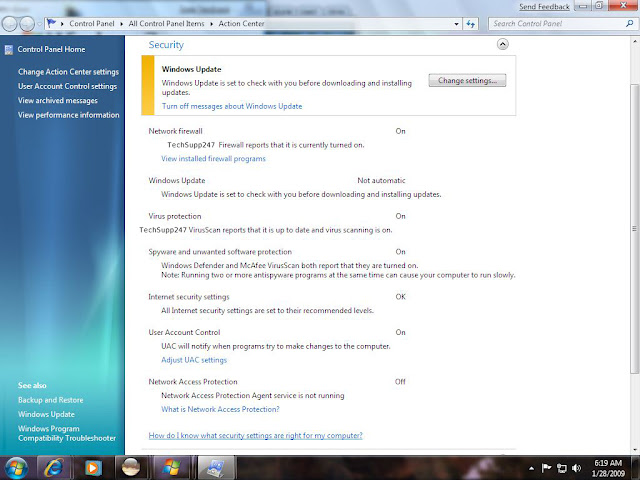
Use the Windows Security Center (Use Action Center in Windows 7)


The Windows Security Center will detect and list currently installed antivirus software, including third-party software. The Security Center runs in the background as you use your computer, constantly checking the state of three important security components: an Internet firewall, antivirus software, and Automatic Updates.
Note: The Windows Security Center may look and act differently if you have installed additional security software that changes its functionality. If so, contact the software vendor for assistance on managing your security settings.

Get to know your antivirus software

Antivirus software isn’t some deep, dark mystery, nor is it something to be intimidated about. When you install your antivirus software, a tutorial or wizard may appear, providing an overview of your antivirus software, detailing what it does, how to configure the settings, and other things. If something like this doesn’t automatically appear after the installation is finished, you can check the Help files for your antivirus software.

Keep default antivirus settings

In order for your antivirus software to do its job (and for you to be certain that it’s doing this job), there are certain settings that are enabled by default when you install the software and that shouldn’t be disabled for extended periods of time. If you have to disable these settings (for example, to install a new software program), be sure to re-enable them as soon as possible. These settings include:

"On-access" or "real-time" scanning: Disabling this option can leave you vulnerable to threats. An icon should appear in the notification area of the taskbar to indicate that this setting is enabled. If you click the icon, you may see details about your antivirus software settings. (Clicking the icon for your antivirus software in the Programs list on the Start menu should give you the same information.)

Scheduled scan of your hard disk and other drives: Your antivirus software should be set to perform a scan of your hard disk on a regular basis.

Scan all e-mail: Your antivirus software should be configured to scan all incoming e-mail messages for viruses.

Stay current

Outdated antivirus software becomes less effective because your virus definitions must be updated regularly to help protect you against the latest threats. Here are some tips to make sure your antivirus software stays current:
  • Purchase an annual subscription from your antivirus software company.
  • Open your antivirus program from the Start menu and look for a recent update status. If you still aren't sure if your antivirus software is up to date, contact your antivirus software provider for more information.

October 26, 2010

Why didn't my antivirus software work?

If you feel that you have a virus and your antivirus software  is not picking it up you may be asking yourself “Why Didn’t My Antivirus Software Work?”. The answer can sometimes be complicated but here are a few tips on fixing your antivirus software.

Why Didn’t My Antivirus Software Work?
Many times the problem is that your antivirus software needs to be updated. New viruses are hitting the internet everyday. Keeping your antivirus software up to date will insure that you are fighting each and every new virus out their. If you are not updating your antivirus software it will not know which codes and document types to search for to find viruses or how to get rid of them.

How Do I Update My Antivirus Software?
Many times your antivirus software will update itself. If it is not updating or you are not sure it is updating you should check the preference settings on your software. Often times you can also find out how to update the software by visiting a help or FAQ tab.

I Have Updated My Antivirus But I Still Think I Have A Virus. What Should I Do?
You may want to think about getting a new antivirus program. If you are using a free program it may not be being updated frequently enough to keep up with all the new viruses. This often happens with free programs. There are many subscription based antivirus programs out on the market that offer many updates to their systems. When it comes to antivirus software usually the more you pay the better service you will receive and service means updates which protect your computer from new viruses.

October 21, 2010

What is a Potentially Unwanted Program/Application (PUP)?

What You Need to Know to Avoid Identity Theft
Potentially unwanted applications are programs that are not malicious but may be unsuitable for use in a business environment.

Some applications are non-malicious and possibly useful in the right context, but are not suitable for company networks. Examples are adware, dialers, non-malicious spyware, tools for administering PCs remotely and hacking tools. Certain anti-virus and endpoint security programs can detect such applications on users’ computers and report them. The administrator can then either authorize the applications for use or remove them from the computers.

October 19, 2010

Watch out for fake virus alerts (Rogue software)


Rogue security software, also known as "scareware," is software that appears to be beneficial from a security perspective but provides limited or no security, generates erroneous or misleading alerts, or attempts to lure users into participating in fraudulent transactions.

What is rogue software?

Get Microsoft Silverlight

Related Posts Plugin for WordPress, Blogger...

Search This Blog

Followers

Categories

Twitter Delicious Facebook Digg Stumbleupon Favorites More